How to Add a Class in a Driving License Online: Complete Guide
Adding a new vehicle class to your driving license allows you to drive additional types of vehicles legally. For example, if you already have a license for a motorcycle and want to drive a car, you must apply to add a new class to your driving license.
The online system makes it easy to add a vehicle class without visiting the RTO multiple times. This guide explains everything about adding a class in driving license online, including eligibility, documents, fees, process, and FAQs. Parivahan Seewa
What Does Adding a Class to a Driving License Mean?
Adding a class means updating your existing driving license to include permission to drive additional vehicle categories.
For example:
After approval, your driving license will include the new vehicle category.
Common Vehicle Classes in Driving License
Here are common vehicle classes you can add:
Motorcycle Without Gear (MCWOG)
Scooters and small bikes without gears
Motorcycle With Gear (MCWG)
Standard motorcycles with a gear
Light Motor Vehicle (LMV)
Cars, jeeps, and small vehicles
Transport Vehicle
Commercial vehicles
Taxi, bus, truck
Heavy Motor Vehicle (HMV)
Large commercial vehicles
Each class requires approval and sometimes a driving test.
Why Add a New Class to the Driving License?
Adding a new class is necessary for several reasons:
Legal Requirement
You must have proper authorization to drive specific vehicles.
Avoid Penalties
Driving without proper class authorization may result in fines.
Employment Opportunities
Commercial licenses are required for driving jobs.
Expand Driving Privileges
You can legally drive multiple vehicle types.
Requirements of a new class
You must meet the following requirements:
Valid driving license
You must already have a valid driving license.
Minimum Age Requirement
18 years for private vehicles
20 years for commercial vehicles
Learner License for New Class
You may need a learner license for the new vehicle class.
Driving Skills
You must pass a driving test if required.
Documents Required to Add a Class in Driving License
You need the following documents:
Mandatory Documents
Additional Documents (If Required)
Ensure documents are valid.
Fees for Adding a Class in Driving License
Fees depend on vehicle type and state rules.
Common fees include:
Fees must be paid online.
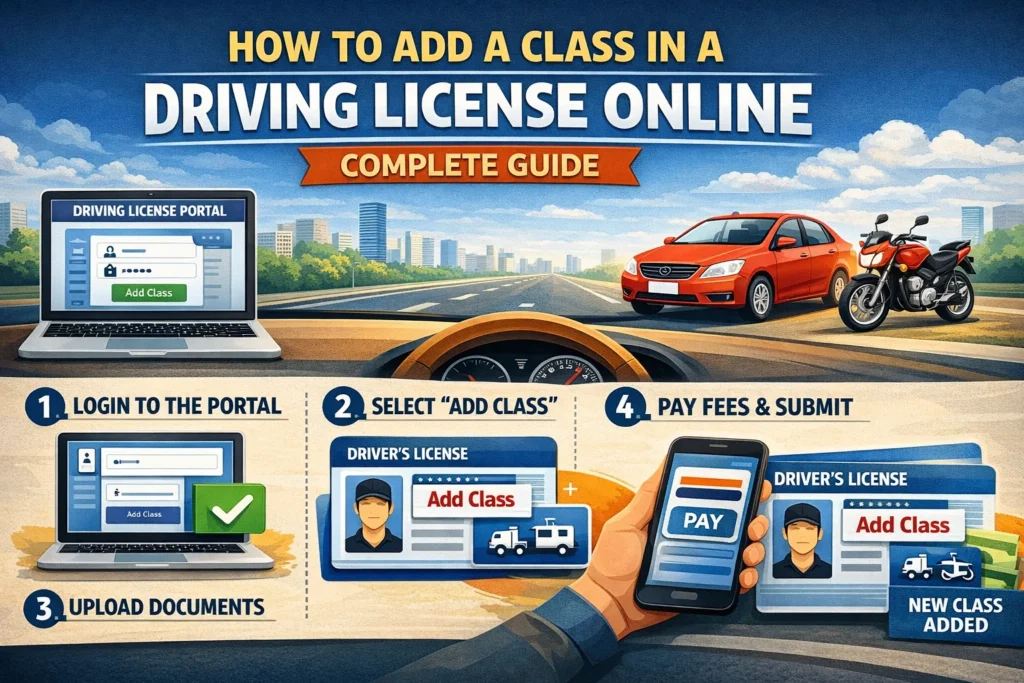
Step-by-Step Process to Add a Class in Driving License Online
Follow these steps carefully:
Step 1: Visit the Official Driving License Portal
Open the official transport services website.
Step 2: Select Your State
Choose your state.
Step 3: Click on Driving License Services
Select the driving license services option.
Step 4: Choose the Add Class Option
Click on “Add Class of Vehicle to Driving License.”
Step 5: Enter Driving License Details
Enter:
Driving license number
Date of birth
Step 6: Select New Vehicle Class
Choose the vehicle class you want to add.
Step 7: Fill Application Form
Enter the required details carefully.
Step 8: Upload Required Documents
Upload scanned copies of the required documents.
Step 9: Pay Application Fee
Pay the fee using:
Debit card, Credit card, Net banking,
Online payment methods
Step 10: Book Driving Test Slot
Book a driving test slot if required.
Step 11: Submit Application
Submit the application and save the reference number.
Driving Test for Adding New Class
A driving test may be required.
Test Includes
Passing the test is mandatory.
What Happens After Passing Driving Test?
After approval:
You can download a digital license.
Processing Time for Adding Class
Processing time usually takes:
Time depends on approval and verification.
How to Check Application Status
Follow these steps:
Step 1: Visit Portal
Open the official driving license portal.
Step 2: Enter Application Number
Enter your application number.
Step 3: Check Status
View application status.
How to Download an Updated Driving License
After approval:
Digital license is valid.
Offline Process to Add a Class in Driving License
You can also apply offline:
Step 1: Visit the RTO Office
Go to your RTO office.
Step 2: Fill Application Form
Fill the required form.
Step 3: Submit Documents
Submit documents.
Step 4: Pay Fees
Pay applicable fees.
Step 5: Attend Driving Test
Complete the driving test.
Step 6: Receive Updated License
An updated license will be issued.
Common Problems During Application
Applicants may face issues such as:
Incorrect Details
Enter the correct information.
Missing Documents
Upload valid documents.
Test Failure
Practice before reattempt.
Payment Failure
Retry payment.
Tips for a Successful Application
Follow these tips:
These steps improve approval chances.
Benefits of Adding a Class to a Driving License
Benefits include:
Legal Driving Authorization
Drive new vehicle types legally.
More Job Opportunities
Commercial licenses increase employment options.
Expanded Driving Privileges
Drive multiple vehicle types.
Easy Online Process
Apply from home.
Frequently Asked Questions (FAQs)
1. Can I add a new class to my driving license online?
Yes, you can apply online.
2. Is a driving test required?
Yes, a test may be required.
3. How long does the process take?
Usually 7 to 30 days.
4. Is a learner’s license required?
Yes, for the new vehicle class.
5. Can I drive a new vehicle without adding class?
No, it is illegal.
6. Can I download the updated license online?
Yes, after approval.
Final Words
Adding a class to your driver’s license is essential if you want to legally drive additional vehicle types. The online system has made the process simple, fast, and convenient.
Make sure to provide correct information, upload the required documents, and pass the driving test if required. After approval, your license will be updated with the new vehicle class.
Always keep your driving license updated to ensure legal compliance and safe driving.